top of page

Education Blog

  • Nov 26, 2020
  • 3 min read
Does the students' opinion on the way a course is taught really matter? I think so.

Christopher Pagan, a physics teacher at Trinidad Garza Early College High School would agree. In a 2016 Edutopia article, Pagan promotes the active use of student feedback surveys to continually adapt and improve his teaching strategies. These surveys allow the students voice their concerns, issues, or highlight the successes of the classroom. This occurs twice a year in Pagan's classes. Mainly these surveys allowed this educator to change his practice.


The outcome was a major improvement in academic success in future classes. At the same time, this strategy acknowledges the value of the students' voice and the ability to make change by voicing their opinions. This character development and increase in academic success has been backed by science.


In the same year a peer reviewed article was released further advocating and legitimizing this as an effective teaching strategy. In this study teachers were given 3 months to modify their teaching strategies and practices based off student feedback surveys (not the same as Pagan uses, but same concept) received earlier in the year. After the time was up, students and teachers were given another feedback form to review if any of the changes made were effective in student engagement and learning. The results was more than two-thirds of the participants felt the student feedback survey is an effective in faculty development.


Now that we have the evidence, let's look at the method! Heres four steps to implementing student feedback surveys according to Pagan:


STEP 1

Build a small group of advocates. Have some teachers' who are willing to document and record their findings. It may be a very new concept for some teachers, so having them see the results is a great start.


STEP 2

Get the all the teachers' comfortable. Explain, practice, and practice! Work together on how this survey is going to look like.


STEP 3

Keep the survey simple and straightforward, you want to make it universal for every subject


STEP 4

Get the students comfortable with the goals of the survey. This is probably very new for them and may be nervous about critiquing their teacher, even if it is constructive criticism.


Once you have collected the feedback, you can now develop and modify your practice accordingly! Remember you have a community of teachers who are conducting these surveys as well, work together to come up with answers to the students' concerns. Below is an example of the survey Trinidad Garza Early College High School uses:


References (APA 7th ed.):


Husain, M., & Khan, S. (2016). Students' feedback: An effective tool in teachers' evaluation system. International journal of applied & basic medical research, 6(3), 178–181. https://doi.org/10.4103/2229-516X.186969


Improving teaching with expert feedback—From students. (2016, June 14). Edutopia. https://www.edutopia.org/practice/student-surveys-using-student-voice-improve-teaching-and-learning.


Idea Galleria is a concept I created. Gallerias are enclosed spaces which showcase a variety stores, dining, and establishments. My Idea Galleria is a repertoire of ideas for teaching strategies, techniques, and methodologies which others have done. Just as any galleria, some stores you may want to enter than others, maybe it is a product you need or you love the style of clothing they sell, whatever the case is that is how I ask you to treat these ideas. There may be one idea that might be just what you need right now and you are willing to try it out.

 
 
  • Nov 25, 2020
  • 3 min read

Updated: Nov 26, 2020

Amazing work can be created through collaboration, guidance, and encouraging students they can do well. A lot of the students were apprehensive because this was the first time they worked on a mosaic project. Through clear instructions and willingness they created a beautiful mosaic that will last for years to come.


Final Mosaic Project


This was a grade 12 AVI4M collaborative mosaic project. As the students were graduating, the goal of this assignment was to create a collaborative project while working on their individual piece. We wanted to create something that would last for many years, even after they've left the school. This was during our mixed media unit, with a focus on environmental and sustainable practices.


The Ontario curriculum covered throughout this project were:

- A.1 The Creative Process: apply the creative process to create a variety of art works, individually and/or collaboratively;

- A.3 Production and Presentation: produce art works, using a variety of media/materials and traditional and emerging technologies, tools, and techniques, and demonstrate an understanding of a variety of ways of presenting their works and the works of others;

- B.1 The Critical Analysis Process: demonstrate an understanding of the critical analysis process by examining, interpreting, evaluating, and reflecting on various art works;

- C.1 Terminology: demonstrate an understanding of, and use correct terminology when referring to, elements, principles, and other components related to visual arts;

- C.2 Conventions and Techniques: demonstrate an understanding of conventions and techniques used in the creation of visual art works;

- C.3 Responsible Practices: demonstrate an understanding of responsible practices related to visual arts.


I'm so proud of their work! This really was an informative teaching experience because a lot of the students developed their skill set, worked collaboratively and finished this project with a sense of pride. It gave me the confirmation that collaborative learning in visual art can be successful. The following are some photos and information about the creative process in developing a graduating mosaic.


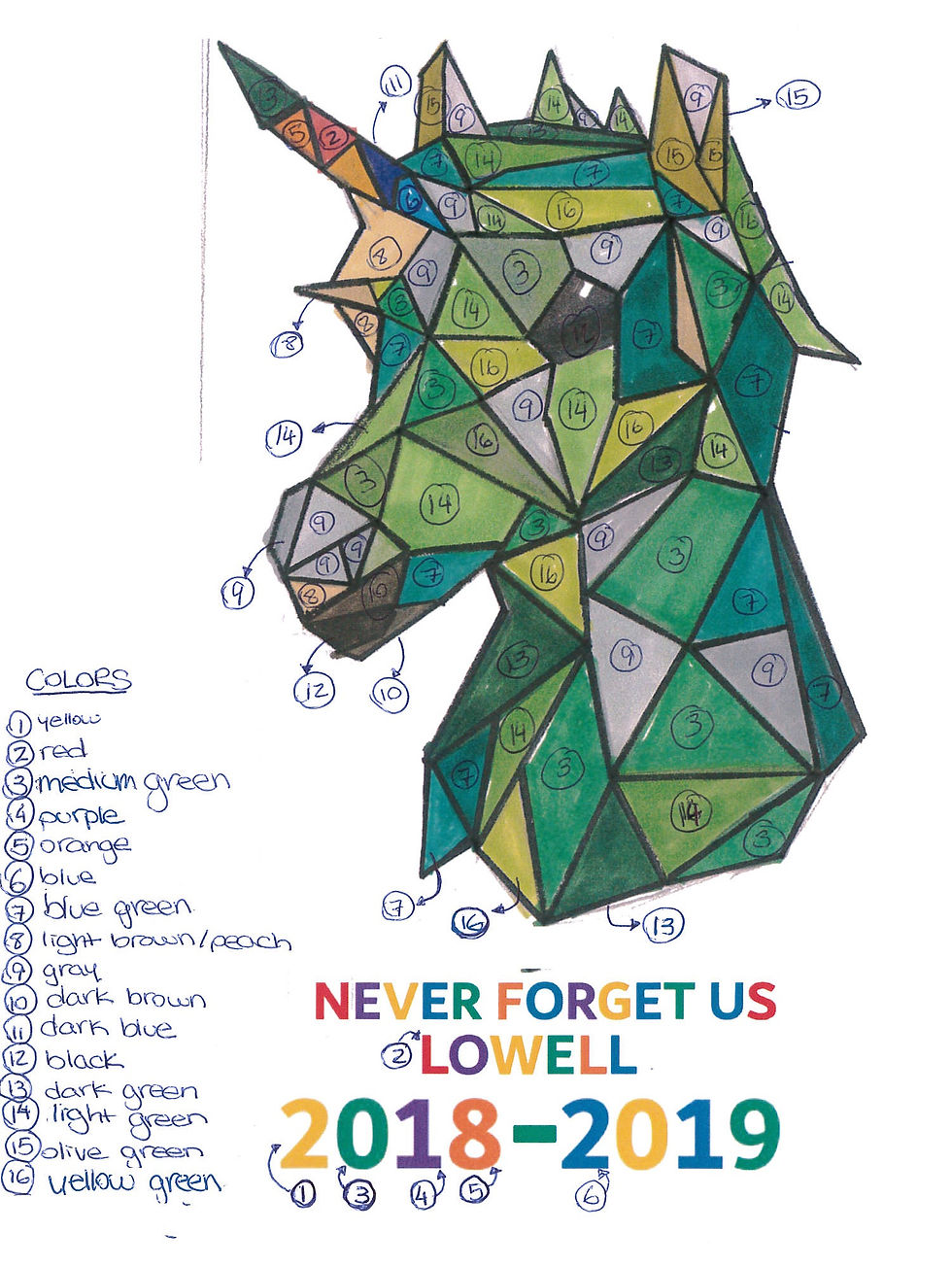
Color Matching Sheet

Students were asked to create a design that would be representative of the school and their graduating class. I asked all students to develop 3 sketches, then a teacher interview would occur to narrow down the sketch to one final image. Once all the students have chosen one image, we displayed them on the board (if the student was willing) and the class voted on their favourite design for the mosaic project.


The chosen image was the one above; a unicorn as a geometric style in the school colours with a message 'Never Forget Us 2018-2019'. The unicorn was chosen because the members of the graduating class are just and unique and special as a unicorn. Frankly, I believe the main reason was because they just really liked unicorns and liked the image.


Mosaic image projected on paper to be traced.

Once the image was decided, the class taped together 8x11'' sheet appropriate for the frame size. Students traced the image projected on the pages. Using the colour matching sheet and their section of the mosaic they will be working on, students used various tools to break the plates. These plates were old plates that were going to be thrown away or donated to Salvation Army.


Students' apply grout between ceramic pieces.

Students' were asked to glue down their ceramic pieces to a mesh-backing. These sections was one of those 8x11'' sheets of paper that they traced previously. I asked students to work on their section separately while working in collaboration with their classmate to make sure their section would fit and aline with the others. That was probably the hardest part and if I were to do this project again with students' I would have them work all together on top of the frame where the mosaic would lie.


Students' follow colour sheet and paint accordingly.

Once all the sections were attached to the mosaic frame the students used grout to fill in the cracks. The students and I decided white would be the best grout colour. Afterwards, using the colour matching sheet and various tints and shades of green paint, we painted the individual tiles. This part was fun, but it was time consuming!


Overall the project came with quite a few steps and a lot of dedication which these students had! Below is the step-by-step guide of the Graduating Class Mosaic Assignment.


We are in a pandemic and that has forced many teachers in a position of having to refigure the teaching methods and the resources they use. Where once a English teacher would have a whiteboard to explain the elements of poetry and give students' handouts, that teacher must create PowerPoint, upload the handouts and if they are lucky enough to find the time to use user-friendly apps to make the content more engaging. After the pandemic, educators should use these apps in the classroom for teach their tech-savvy students. Get in with the times, right?


I decided to discover a few apps and websites geared towards education because sometimes its overwhelming the amount of options. Also, with so many things to do, educators may not have the opportunity to look for the best app for what's needed. I've divide the apps and websites into the following categories:


Classroom Management


It is a free web-based platform that integrates your G Suite for Education account with all G Suite services. This makes it easy to create classes, distribute assignments, communicate, and stay organized.


It is a simple way for teachers and students to record and share what's happening in the classroom. Students' even get their own journal to keep track of class information!


It is a place where you can manage all your files, assignments, assessments, learning outcomes, and badges. I have personally used this system and there's a bit of a learning curve, but once you get that (and explain it to your students!) its straight-forward. The interface is quite outdated and the navigation tools do need some work. Overall, very reliable!


Teaching Tools

This site allows users to produce videos that blend photos, video clips, text and music. Great for media arts expectations in English courses and projects.


It is an online interactive whiteboard app where students can collaborate in real-time both visually and text. This is great for visual learners.


Students can answer on their own devices, while questions are displayed on a shared screen. It is like playing a game while learning.


Similar to Kahoot, students answer on their own devices, while questions and answers in the form of mind maps, polls, and graphs are displayed real-time. This is a GoogleSlides extension.


It allows teachers to create simple quizzes that students can take quickly on laptops.


It allows students & teachers to create, discover and share learning resources. Teachers can create flashcards, mind maps, notes and quizzes.


Communication for Parents and Students

It allows teachers to share content, distribute quizzes, assignments, and manage communication with students, colleagues, and parents.


Similar to Edmodo, messages are sent in real time to an entire class, a small group, or just a single person. You can also schedule announcements ahead of time and attach photos and other files.


Free Digital Book Databases

Is a library of over 60,000 free eBooks that can be downloaded or read them online.


Similar to Project Guttenburg, this is an open, editable library catalog, building towards a web page for every book ever published.


You Might Get Newsletters

Thanks for submitting!

bottom of page